<div class="page-header with-image bleed">
            <picture>
            <img src="https://moecat.cc/wp-content/uploads/2024/11/1732523427-image.png" width="1920" height="400" class="feature-image wp-post-image" alt="" decoding="async" fetchpriority="high">
        </picture>
        <header class="post-header">
        <h1 class="post-title" style="">OCS网课助手使用教程（持续更新）</h1>
        <div class="post-metas">
                            <span>最后更新于 2026-09-02</span>
                                <a href="https://moecat.cc/author/nicocat/">
                    <span class="meta-author">
                        <img alt='nicocat' src='https://weavatar.com/avatar/1aeca73a20d6fea54d81269e6bc00175745e013f9a221a1ccd9492e2ff726287?s=24&#038;d=mm&#038;r=g' srcset='https://weavatar.com/avatar/1aeca73a20d6fea54d81269e6bc00175745e013f9a221a1ccd9492e2ff726287?s=48&#038;d=mm&#038;r=g 2x' class='avatar avatar-24 photo avatar-small' height='24' width='24' loading='lazy' decoding='async'/>                        nicocat                    </span>
                </a>
                                <span>15914 次阅读</span>
                        </div>
    </header>
</div>
<p class="wp-block-paragraph">OCS网课助手是由enncy开发的一款浏览器脚本，完成安装配置以后可以实现部分网课平台的自动刷课、自动答题等功能，解放双手。</p>


<p class="wp-block-paragraph">项目地址：</p>


<p class="wp-block-paragraph">
<div class="block-ghcard">
    <div class="github-card">
        <a href="https://github.com/ocsjs/ocsjs" target="_blank" rel="noopener">
            <header class="repo-name">
                <span class="title-text">
                    <i class="icon gh-repo"></i>
                    ocsjs                </span>
            </header>

                            <div class="repo-desc">
                    OCS 网课助手，刷课脚本，网课脚本，帮助大学生解决网课难题，支持【超星学习通】【知道智慧树】【职教云】【智慧职教】【中国大学MOOC】等网课  ， 可以在 脚本猫 以及 油猴 等开源脚本管理器下运行。                </div>
            
            <div class="repo-meta">
                                    <span class="lang">
                        <span class="dot" style="background-color: #999;"></span>
                        TypeScript                    </span>
                
                <span class="stars">
                    <i class="icon gh-star"></i>
                    5112                </span>

                <span class="forks">
                    <i class="icon gh-fork"></i>
                    368                </span>

                                    <span class="license">
                        <i class="icon gh-license"></i>
                        mit                    </span>
                            </div>
        </a>
    </div>
</div></p>


<p class="wp-block-paragraph">官网：<a href="https://docs.ocsjs.com/" rel="nofollow" target="_blank">https://docs.ocsjs.com/</a></p>


<hr class="wp-block-separator has-alpha-channel-opacity"/>


<h2 id="h-快速上手" class="wp-block-heading">快速上手</h2>


<h3 class="wp-block-heading">在Windows上使用OCS网课助手</h3>


<p class="wp-block-paragraph">Microsoft Edge：点击进入微软插件市场安装<a href="https://microsoftedge.microsoft.com/addons/detail/%E7%AF%A1%E6%94%B9%E7%8C%B4/iikmkjmpaadaobahmlepeloendndfphd?hl=zh-CN" rel="nofollow" target="_blank">篡改猴 - Microsoft Edge Addons</a><br>Google Chrome：点击进入Chrome应用商店安装<a href="https://chromewebstore.google.com/detail/tampermonkey/dhdgffkkebhmkfjojejmpbldmpobfkfo?hl=zh-CN&amp;utm_source=ext_sidebar" rel="nofollow" target="_blank">Tampermoneky</a><br>其余同理，浏览器安装Tampermonkey插件即可。</p>


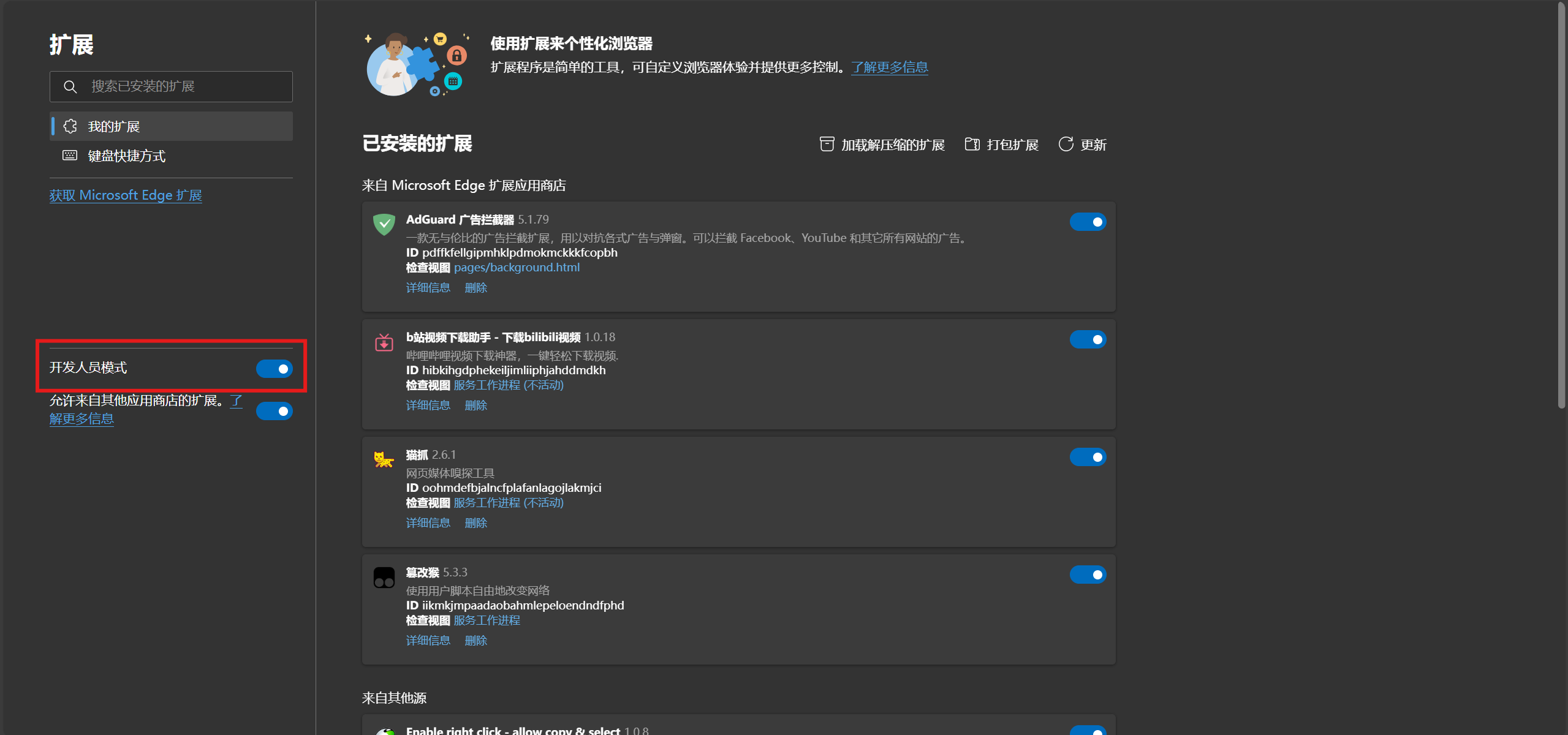
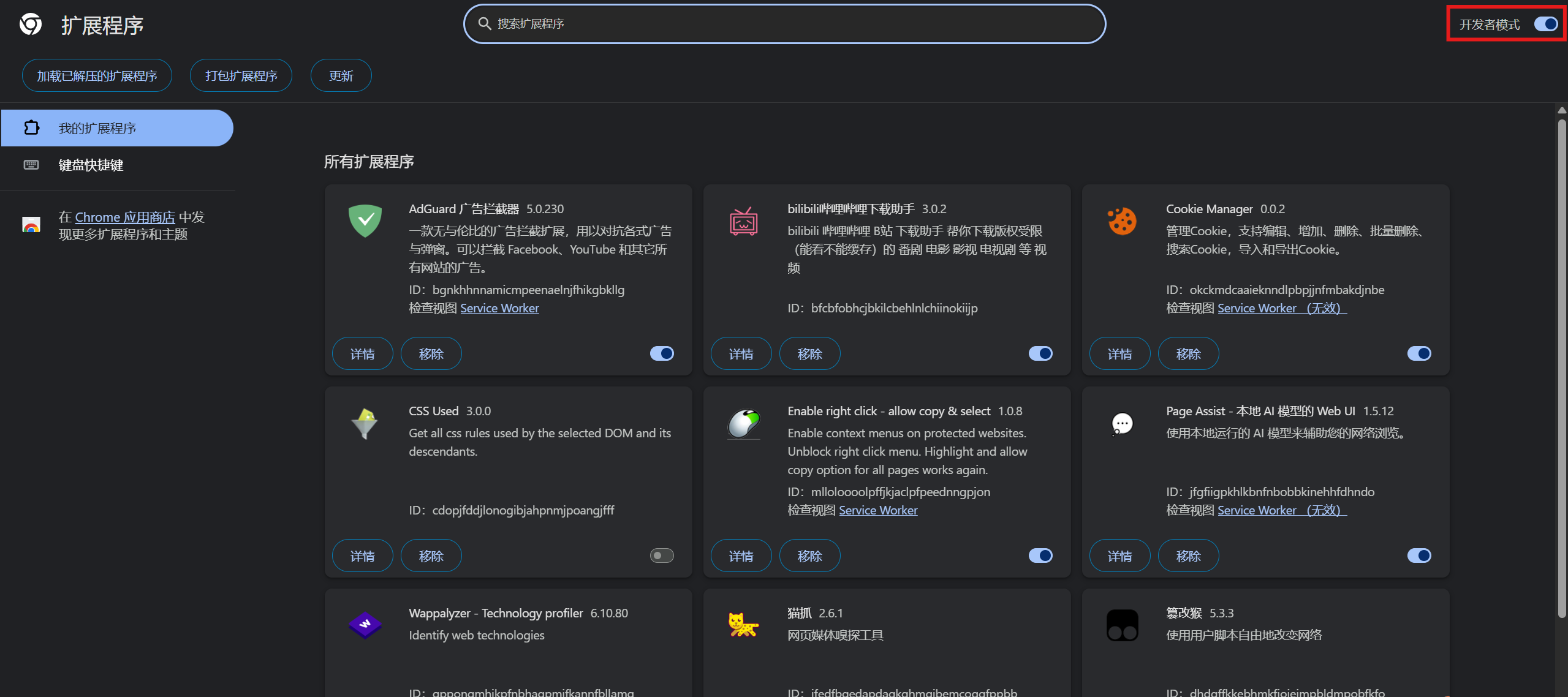
<p class="wp-block-paragraph">然后在拓展管理中开启“开发者模式”确保功能可以正常运行。</p>


<figure class="wp-block-gallery has-nested-images columns-default is-cropped wp-block-gallery-1 is-layout-flex wp-block-gallery-is-layout-flex">
<figure class="wp-block-image size-large"><a href="https://nicocat.cc/wp-content/uploads/2024/11/1747230727-kfz2.png" target="_blank" rel="nofollow noopener noreferrer"><img onerror="iroImgError(this)" loading="lazy" decoding="async" width="1024" height="480" data-id="1299" src="https://nicocat.cc/wp-content/uploads/2024/11/1747230727-kfz2-1024x480.png" alt="Edge插件开发者模式" class="wp-image-1299" srcset=" https://moecat.cc/wp-content/uploads/2024/11/1747230727-kfz2-1024x480.png 1024w, https://moecat.cc/wp-content/uploads/2024/11/1747230727-kfz2-300x141.png 300w, https://moecat.cc/wp-content/uploads/2024/11/1747230727-kfz2-768x360.png 768w, https://moecat.cc/wp-content/uploads/2024/11/1747230727-kfz2-1536x720.png 1536w, https://moecat.cc/wp-content/uploads/2024/11/1747230727-kfz2-2048x960.png 2048w" sizes="auto, (max-width: 1024px) 100vw, 1024px" / title="OCS网课助手使用教程（持续更新）"></a></figure>


<figure class="wp-block-image size-large"><a href="https://nicocat.cc/wp-content/uploads/2024/11/1747230727-kfz1.png" target="_blank" rel="nofollow noopener noreferrer"><img onerror="iroImgError(this)" loading="lazy" decoding="async" width="1024" height="455" data-id="1300" src="https://nicocat.cc/wp-content/uploads/2024/11/1747230727-kfz1-1024x455.png" alt="Chrome插件开发者模式" class="wp-image-1300" srcset=" https://moecat.cc/wp-content/uploads/2024/11/1747230727-kfz1-1024x455.png 1024w, https://moecat.cc/wp-content/uploads/2024/11/1747230727-kfz1-300x133.png 300w, https://moecat.cc/wp-content/uploads/2024/11/1747230727-kfz1-768x342.png 768w, https://moecat.cc/wp-content/uploads/2024/11/1747230727-kfz1-1536x683.png 1536w, https://moecat.cc/wp-content/uploads/2024/11/1747230727-kfz1-2048x911.png 2048w" sizes="auto, (max-width: 1024px) 100vw, 1024px" / title="OCS网课助手使用教程（持续更新）"></a></figure>
</figure>


<p class="wp-block-paragraph">脚本安装：点击进入<a href="https://greasyfork.org/zh-CN/scripts/457151-ocs-%E7%BD%91%E8%AF%BE%E5%8A%A9%E6%89%8B" target="_blank" rel="nofollow noopener noreferrer">Greasyfork</a>，点击安装即可</p>


<p class="wp-block-paragraph">如果因为网络原因打不开，可以前往作者的Github发布页：<br><a href="https://github.com/ocsjs/ocsjs/releases" target="_blank" rel="noreferrer noopener nofollow">https://github.com/ocsjs/ocsjs/releases</a><br>安装<a href="https://cdn.ocsjs.com/ocs.user.js" target="_blank" rel="noreferrer noopener nofollow">ocs.user.js</a>(此为ocsjs官网的腾讯云cdn直装链接)<br>如果访问不稳定可以尝试安装我保存的旧版：<a href="/mods/ocs.user.js" data-type="link" data-id="/mods/ocs.user.js" target="_blank" rel="noreferrer noopener nofollow">ocs.commom.user.js</a></p>


<p class="wp-block-paragraph">以下启用MainfestV2支持为可选操作，作者声明在最新版已经适配了MainfestV3，如果你觉得不妥或者出现了故障可以尝试以下操作。</p>


<div class="wp-block-media-text has-media-on-the-right is-stacked-on-mobile"><div class="wp-block-media-text__content">
<h4 class="wp-block-heading">允许用户脚本</h4>


<p class="wp-block-paragraph">在Chrome138版本及以上的浏览器中，你还需要在TamperMonkey的拓展设置中，额外开启允许用户脚本，然后重启浏览器。<br></p>


<blockquote class="wp-block-quote is-layout-flow wp-block-quote-is-layout-flow">
<p class="wp-block-paragraph">由于用户脚本的两步授权过程，需要额外的权限：<code>userScripts</code> 权限和切换开关或开发者模式。 仅有 <code>userScripts</code> 权限在安装时不会触发用户警告，反映了 Google 确保用户在运行使用用户脚本的扩展时做出明智决定的意图。<sup>来自<a href="https://www.tampermonkey.net/faq.php?q=Q209#Q209" target="_blank" rel="noopener nofollow">TamperMonkey文档</a></sup></p>
</blockquote>
</div><figure class="wp-block-media-text__media"><a href="https://wp.nicocat.cc/wp-content/uploads/2024/11/allow_userscripts.png" target="_blank" rel="nofollow noopener noreferrer"><img onerror="iroImgError(this)" loading="lazy" decoding="async" width="1024" height="472" src="https://wp.nicocat.cc/wp-content/uploads/2024/11/allow_userscripts-1024x472.png" alt="" class="wp-image-1588 size-large" srcset=" https://moecat.cc/wp-content/uploads/2024/11/allow_userscripts-1024x472.png 1024w, https://moecat.cc/wp-content/uploads/2024/11/allow_userscripts-300x138.png 300w, https://moecat.cc/wp-content/uploads/2024/11/allow_userscripts-768x354.png 768w, https://moecat.cc/wp-content/uploads/2024/11/allow_userscripts-1536x708.png 1536w, https://moecat.cc/wp-content/uploads/2024/11/allow_userscripts-2048x944.png 2048w" sizes="auto, (max-width: 1024px) 100vw, 1024px" / title="OCS网课助手使用教程（持续更新）"></a></figure></div>


<div class="wp-block-media-text has-media-on-the-right is-stacked-on-mobile"><div class="wp-block-media-text__content">
<h4 class="wp-block-heading">启用Mainfest V2支持</h4>


<p class="wp-block-paragraph">在最新的浏览器中，相关功能可能升级为了V3版本，对网课脚本的功能进行了进一步限制，可能导致脚本无法正常刷课答题，你可以在浏览器的标题栏输入chrome://flags或edge://flags/进入如左图所示页面，启用M137 flags、M138 flags和Allow legacy extension manifest versions这三个功能，改为Enable，然后重启浏览器。<br></p>


<p class="wp-block-paragraph">如果找不到你可以使用键盘上的ctrl+F键呼出文字搜索功能</p>
</div><figure class="wp-block-media-text__media"><a href="https://nicocat.cc/wp-content/uploads/2024/11/1756904894-屏幕截图-2025-09-03-210721.png" target="_blank" rel="nofollow noopener noreferrer"><img onerror="iroImgError(this)" loading="lazy" decoding="async" width="1024" height="473" src="https://wp.nicocat.cc/wp-content/uploads/2024/11/1756904894-屏幕截图-2025-09-03-210721-1024x473.png" alt="启用Mainfest V2" class="wp-image-1391 size-large" srcset=" https://moecat.cc/wp-content/uploads/2024/11/1756904894-屏幕截图-2025-09-03-210721-1024x473.png 1024w, https://moecat.cc/wp-content/uploads/2024/11/1756904894-屏幕截图-2025-09-03-210721-300x139.png 300w, https://moecat.cc/wp-content/uploads/2024/11/1756904894-屏幕截图-2025-09-03-210721-768x355.png 768w, https://moecat.cc/wp-content/uploads/2024/11/1756904894-屏幕截图-2025-09-03-210721-1536x709.png 1536w, https://moecat.cc/wp-content/uploads/2024/11/1756904894-屏幕截图-2025-09-03-210721-2048x946.png 2048w" sizes="auto, (max-width: 1024px) 100vw, 1024px" / title="OCS网课助手使用教程（持续更新）"></a></figure></div>


<div class="wp-block-media-text has-media-on-the-right is-stacked-on-mobile" style="grid-template-columns:auto 40%"><div class="wp-block-media-text__content">
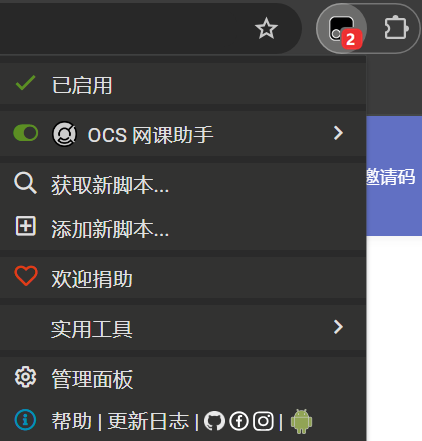
<p class="wp-block-paragraph">进入你的网课课程网页：</p>


<p class="wp-block-paragraph">观察OCS网课助手脚本是否已经正常工作</p>


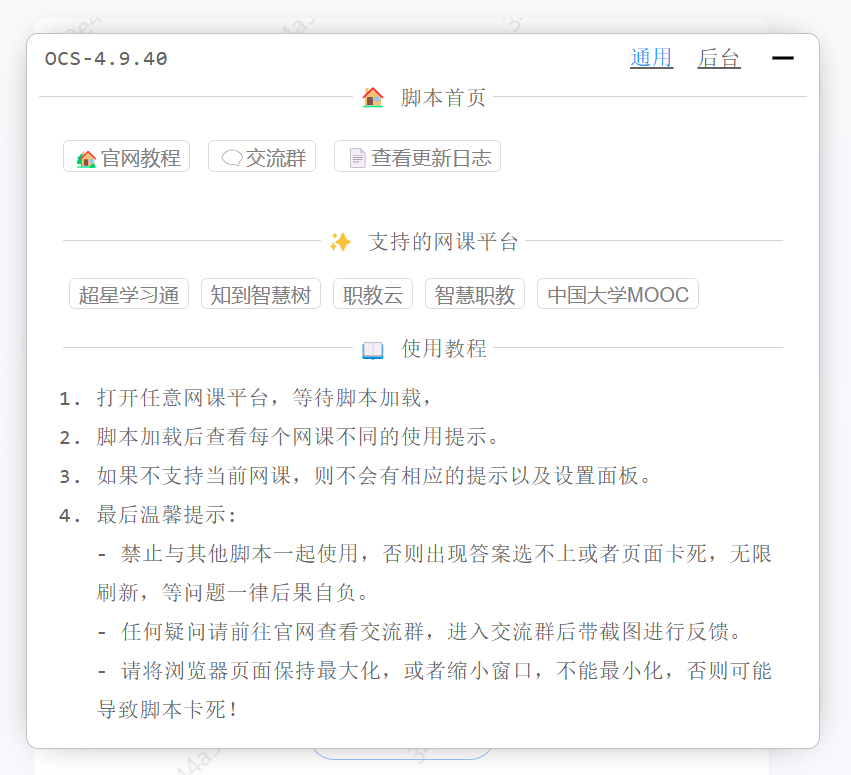
<p class="wp-block-paragraph">脚本管理器提示脚本已经成功运行，应该就可以看到OCS网课助手的悬浮窗了</p>
</div><figure class="wp-block-media-text__media"><a href="https://nicocat.cc/wp-content/uploads/2024/11/1732521545-image.png" target="_blank" rel="nofollow noopener noreferrer"><img onerror="iroImgError(this)" loading="lazy" decoding="async" width="422" height="441" src="https://nicocat.cc/wp-content/uploads/2024/11/1732521545-image.png" alt="TamperMonkey菜单" class="wp-image-509 size-full" srcset=" https://moecat.cc/wp-content/uploads/2024/11/1732521545-image.png 422w, https://moecat.cc/wp-content/uploads/2024/11/1732521545-image-287x300.png 287w" sizes="auto, (max-width: 422px) 100vw, 422px" / title="OCS网课助手使用教程（持续更新）"></a></figure></div>


<figure class="wp-block-gallery has-nested-images columns-default is-cropped wp-block-gallery-2 is-layout-flex wp-block-gallery-is-layout-flex">
<figure class="wp-block-image size-large"><a href="https://nicocat.cc/wp-content/uploads/2024/11/1732523357-image.png" target="_blank" rel="nofollow noopener noreferrer"><img onerror="iroImgError(this)" decoding="async" src="https://nicocat.cc/wp-content/uploads/2024/11/1732523357-image.png" alt="OCS网课助手脚本首页"/ title="OCS网课助手使用教程（持续更新）"></a></figure>


<figure class="wp-block-image size-large"><a href="https://nicocat.cc/wp-content/uploads/2024/11/1732523427-image.png" target="_blank" rel="nofollow noopener noreferrer"><img onerror="iroImgError(this)" decoding="async" src="https://nicocat.cc/wp-content/uploads/2024/11/1732523427-image.png" alt="OCS网课助手脚本设置页"/ title="OCS网课助手使用教程（持续更新）"></a></figure>
</figure>


<hr class="wp-block-separator has-alpha-channel-opacity"/>


<h4 id="h-自动完成网课任务" class="wp-block-heading">自动完成网课任务</h4>


<div class="wp-block-media-text is-stacked-on-mobile" style="grid-template-columns:31% auto"><figure class="wp-block-media-text__media"><a href="https://nicocat.cc/wp-content/uploads/2024/11/1732605687-image.png" target="_blank" rel="nofollow noopener noreferrer"><img onerror="iroImgError(this)" loading="lazy" decoding="async" width="706" height="1003" src="https://nicocat.cc/wp-content/uploads/2024/11/1732605687-image.png" alt="OCS网课助手答题设置页" class="wp-image-520 size-full" srcset=" https://moecat.cc/wp-content/uploads/2024/11/1732605687-image.png 706w, https://moecat.cc/wp-content/uploads/2024/11/1732605687-image-211x300.png 211w" sizes="auto, (max-width: 706px) 100vw, 706px" / title="OCS网课助手使用教程（持续更新）"></a></figure><div class="wp-block-media-text__content">
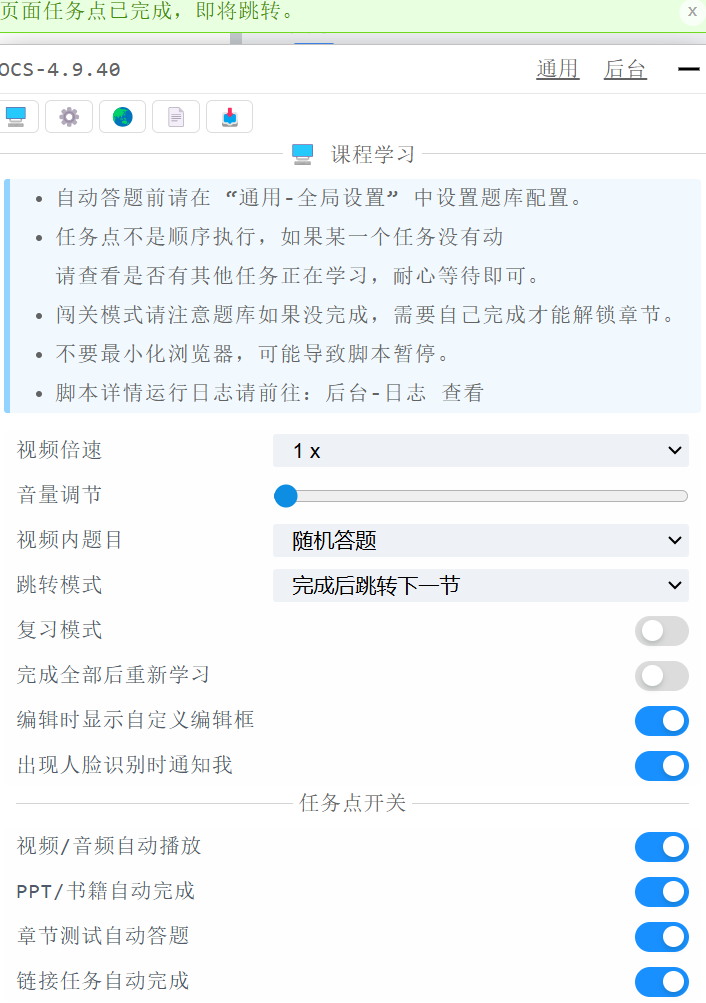
<p class="wp-block-paragraph">在启用该插件后，在支持的网课网站进入课程任务页面后OCS网课助手脚本会自动刷课、自动完成学习任务，无需人工干预</p>
</div></div>


<div class="wp-block-media-text is-stacked-on-mobile" style="grid-template-columns:32% auto"><figure class="wp-block-media-text__media"><a href="https://nicocat.cc/wp-content/uploads/2024/11/1732605993-image.png" target="_blank" rel="nofollow noopener noreferrer"><img onerror="iroImgError(this)" loading="lazy" decoding="async" width="616" height="807" src="https://nicocat.cc/wp-content/uploads/2024/11/1732605993-image.png" alt="OCS网课助手正在答题" class="wp-image-521 size-full" srcset=" https://moecat.cc/wp-content/uploads/2024/11/1732605993-image.png 616w, https://moecat.cc/wp-content/uploads/2024/11/1732605993-image-229x300.png 229w" sizes="auto, (max-width: 616px) 100vw, 616px" / title="OCS网课助手使用教程（持续更新）"></a></figure><div class="wp-block-media-text__content">
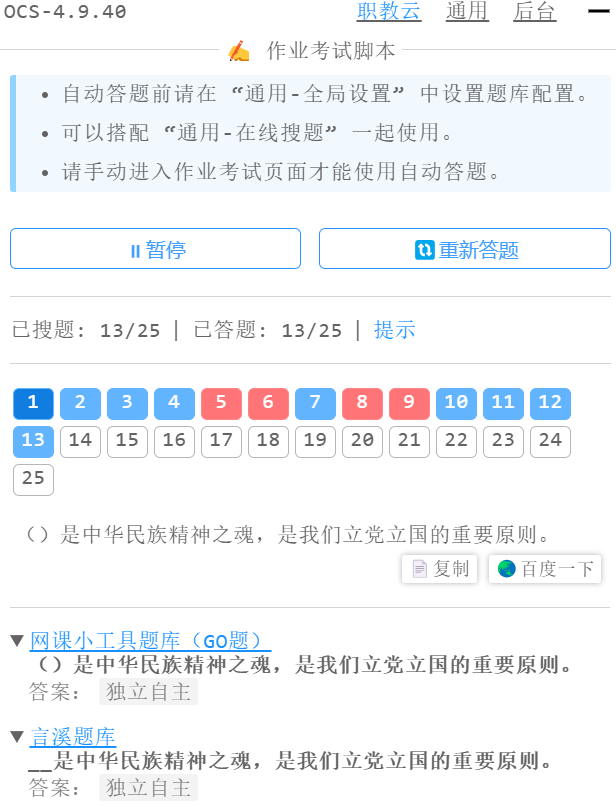
<p class="wp-block-paragraph">在进入作业/考试页面后，OCS网课助手脚本会自动获取题目内容，<br>通过在线的题库服务获取结果后会自动填充到作业/考试的题目空中，帮助你完成任务<br>可用的题目类型包括选择和填空等，较为客观的题目仍需手动完成</p>
</div></div>


<div class="wp-block-media-text is-stacked-on-mobile"><figure class="wp-block-media-text__media"><a href="https://nicocat.cc/wp-content/uploads/2024/11/1732606121-image.png" target="_blank" rel="nofollow noopener noreferrer"><img onerror="iroImgError(this)" loading="lazy" decoding="async" width="1024" height="618" src="https://nicocat.cc/wp-content/uploads/2024/11/1732606121-image-1024x618.png" alt="OCS网课助手题库设置" class="wp-image-522 size-full" srcset=" https://moecat.cc/wp-content/uploads/2024/11/1732606121-image-1024x618.png 1024w, https://moecat.cc/wp-content/uploads/2024/11/1732606121-image-300x181.png 300w, https://moecat.cc/wp-content/uploads/2024/11/1732606121-image-768x463.png 768w, https://moecat.cc/wp-content/uploads/2024/11/1732606121-image.png 1430w" sizes="auto, (max-width: 1024px) 100vw, 1024px" / title="OCS网课助手使用教程（持续更新）"></a></figure><div class="wp-block-media-text__content">
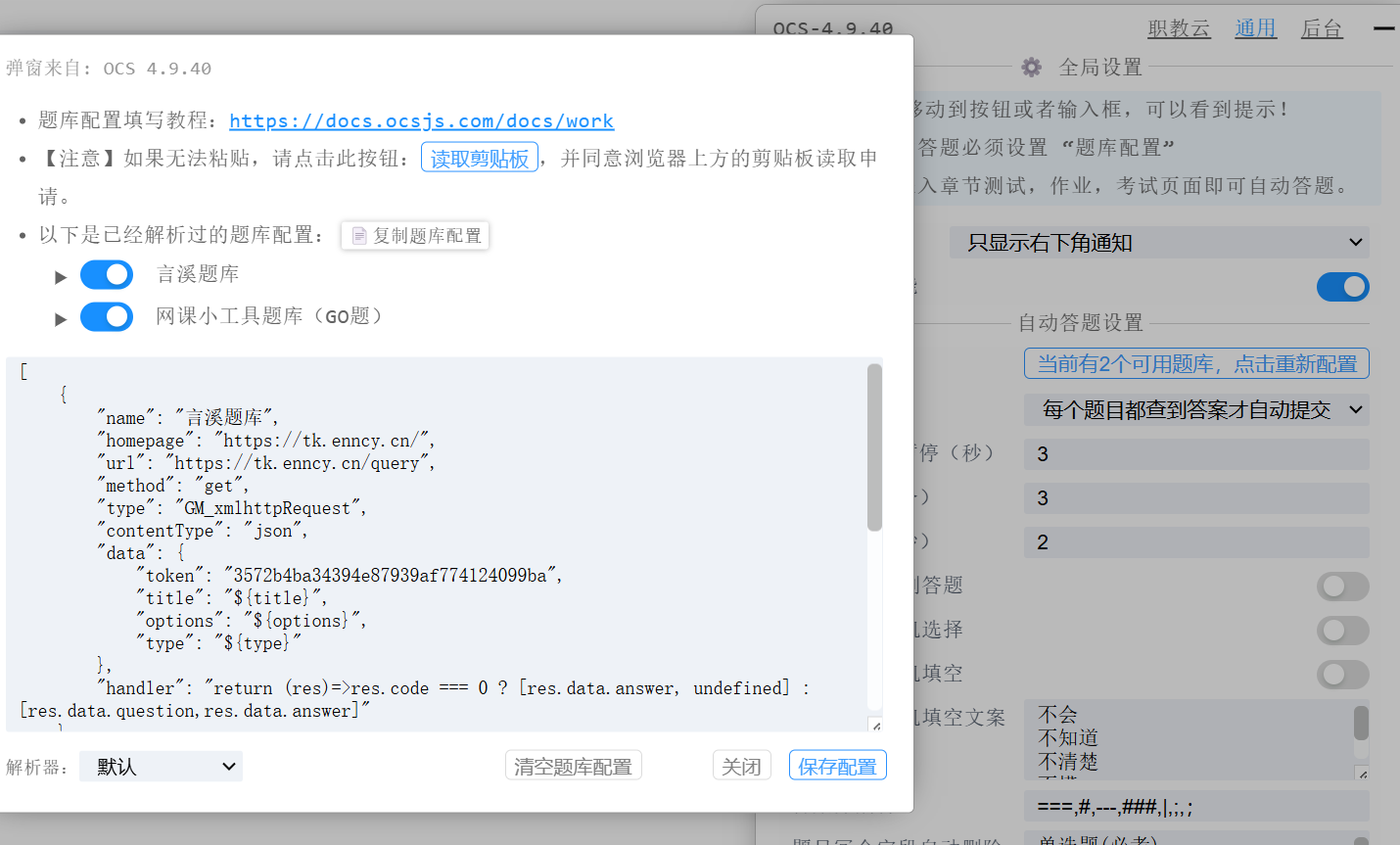
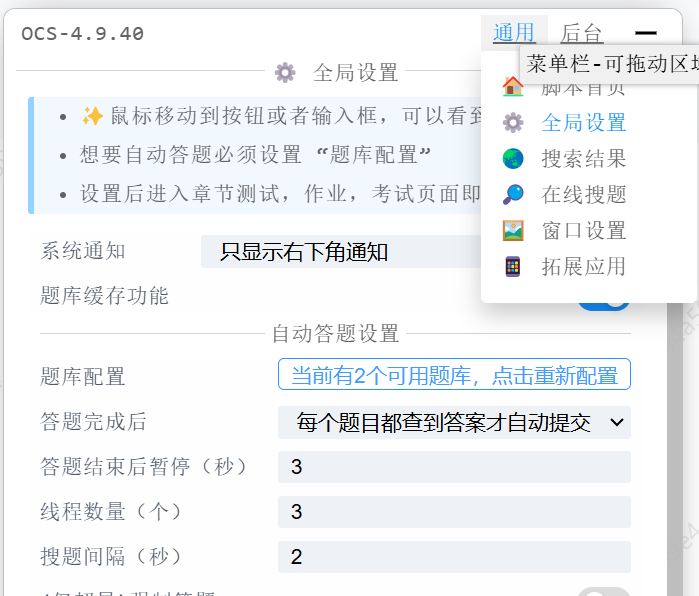
<p class="wp-block-paragraph">你可以在全局设置中配置你的题库，<br>该服务可能需要付费</p>
</div></div>


<div class="wp-block-media-text is-stacked-on-mobile"><figure class="wp-block-media-text__media"><a href="https://nicocat.cc/wp-content/uploads/2024/11/1732606277-image.png" target="_blank" rel="nofollow noopener noreferrer"><img onerror="iroImgError(this)" loading="lazy" decoding="async" width="1024" height="573" src="https://nicocat.cc/wp-content/uploads/2024/11/1732606277-image-1024x573.png" alt="OCS网课助手划词搜索" class="wp-image-523 size-full" srcset=" https://moecat.cc/wp-content/uploads/2024/11/1732606277-image-1024x573.png 1024w, https://moecat.cc/wp-content/uploads/2024/11/1732606277-image-300x168.png 300w, https://moecat.cc/wp-content/uploads/2024/11/1732606277-image-768x430.png 768w, https://moecat.cc/wp-content/uploads/2024/11/1732606277-image.png 1412w" sizes="auto, (max-width: 1024px) 100vw, 1024px" / title="OCS网课助手使用教程（持续更新）"></a></figure><div class="wp-block-media-text__content">
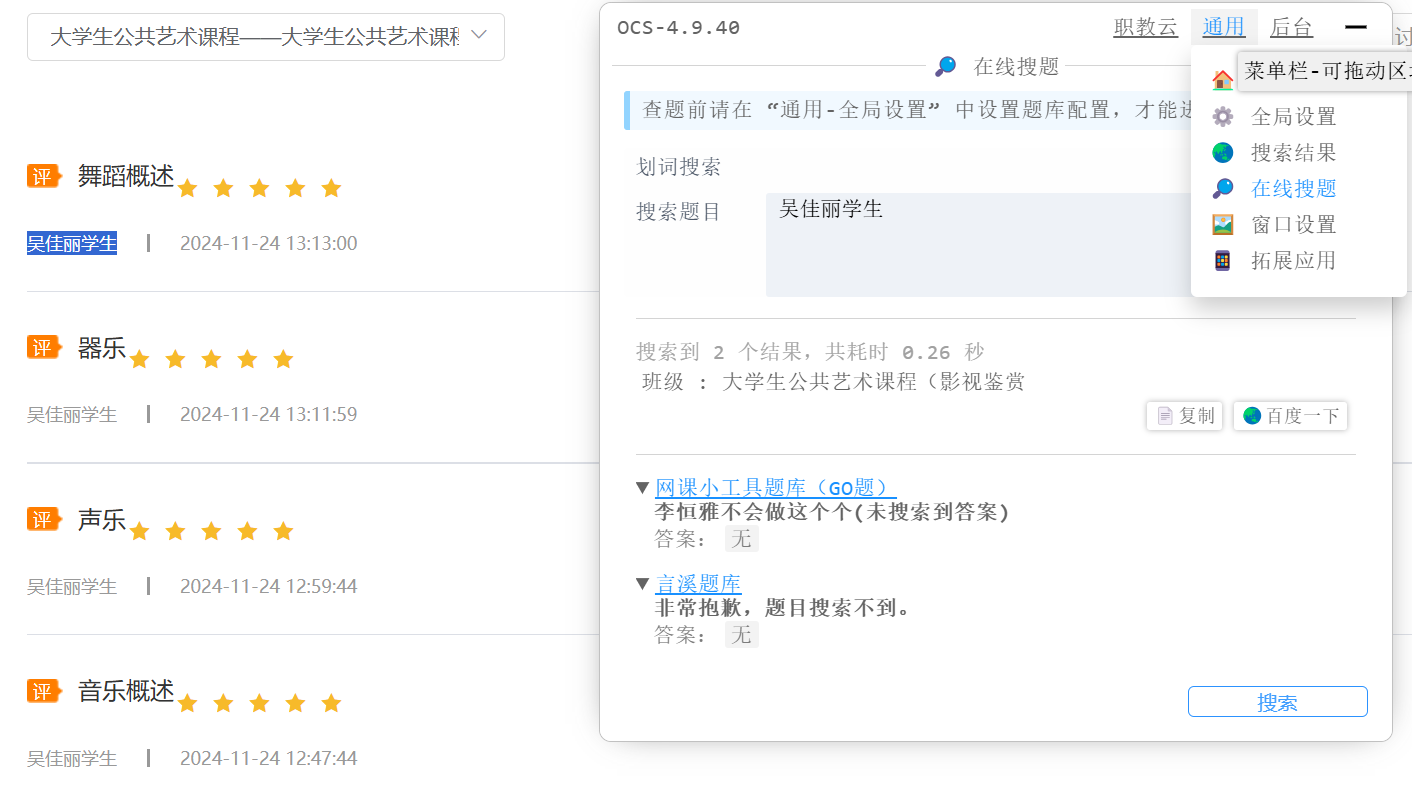
<p class="wp-block-paragraph">在不支持自动答题的页面仍然可以使用划词搜索</p>
</div></div>


<div class="wp-block-media-text is-stacked-on-mobile"><figure class="wp-block-media-text__media"><a href="https://nicocat.cc/wp-content/uploads/2024/11/1732606622-image.png" target="_blank" rel="nofollow noopener noreferrer"><img onerror="iroImgError(this)" loading="lazy" decoding="async" width="1024" height="443" src="https://nicocat.cc/wp-content/uploads/2024/11/1732606622-image-1024x443.png" alt="言溪题库私人题库" class="wp-image-524 size-full" srcset=" https://moecat.cc/wp-content/uploads/2024/11/1732606622-image-1024x443.png 1024w, https://moecat.cc/wp-content/uploads/2024/11/1732606622-image-300x130.png 300w, https://moecat.cc/wp-content/uploads/2024/11/1732606622-image-768x332.png 768w, https://moecat.cc/wp-content/uploads/2024/11/1732606622-image-1536x664.png 1536w, https://moecat.cc/wp-content/uploads/2024/11/1732606622-image-2048x886.png 2048w" sizes="auto, (max-width: 1024px) 100vw, 1024px" / title="OCS网课助手使用教程（持续更新）"></a></figure><div class="wp-block-media-text__content">
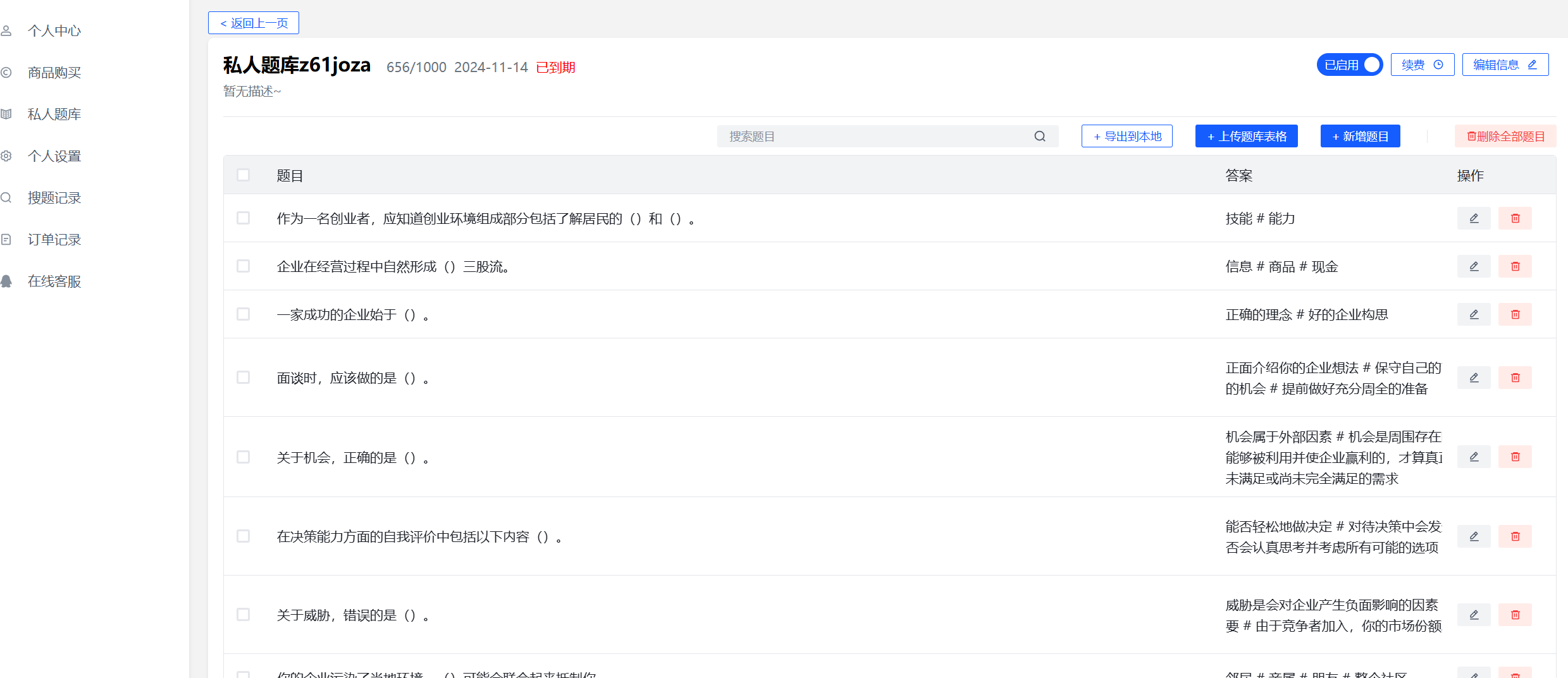
<p class="wp-block-paragraph">在<a href="https://tk.enncy.cn/tk/collect" rel="nofollow" target="_blank">言溪题库解析</a>中可以将学校下发的题库解析并导入到私人题库中使用，补充付费题库没有的解析</p>
</div></div>


<div class="wp-block-media-text is-stacked-on-mobile"><figure class="wp-block-media-text__media"><img onerror="iroImgError(this)" loading="lazy" decoding="async" width="1024" height="509" src="https://nicocat.cc/wp-content/uploads/2024/11/1764217865-AItk-1024x509.png" alt="言溪题库AI答题" class="wp-image-1436 size-full" srcset=" https://moecat.cc/wp-content/uploads/2024/11/1764217865-AItk-1024x509.png 1024w, https://moecat.cc/wp-content/uploads/2024/11/1764217865-AItk-300x149.png 300w, https://moecat.cc/wp-content/uploads/2024/11/1764217865-AItk-768x382.png 768w, https://moecat.cc/wp-content/uploads/2024/11/1764217865-AItk-1536x764.png 1536w, https://moecat.cc/wp-content/uploads/2024/11/1764217865-AItk.png 1981w" sizes="auto, (max-width: 1024px) 100vw, 1024px" / title="OCS网课助手使用教程（持续更新）"></figure><div class="wp-block-media-text__content">
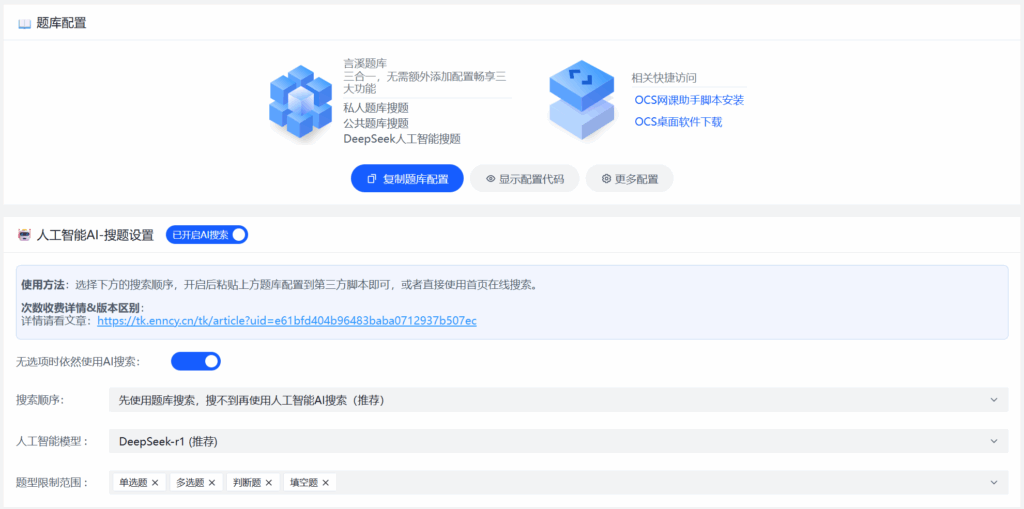
<p class="wp-block-paragraph">言溪题库现在已经支持AI答题了，个人感觉准确率还挺高的，有70%左右吧。有需要的同学可以去言溪题库官网开通，不过相比普通搜题会消耗数倍的次数</p>
</div></div>


<hr class="wp-block-separator has-alpha-channel-opacity"/>


<h3 class="wp-block-heading">在Android上使用OCS网课助手</h3>


<p class="wp-block-paragraph">OCS网课助手支持在所有支持TamperMonkey拓展的浏览器上运行，所以在Android平台上你同样可以使用OCS网课助手愉快刷课甚至做作业。</p>


<h4 class="wp-block-heading">以Firefox为例</h4>


<p class="wp-block-paragraph">首先，在你的Android手机上安装Firefox浏览器（你可以从此处加速下载：<a href="https://pan.quark.cn/s/de727e686b0d" target="_blank" rel="nofollow noopener noreferrer">夸克网盘</a>）<br></p>


<div class="wp-block-media-text has-media-on-the-right is-stacked-on-mobile" style="grid-template-columns:auto 20%"><div class="wp-block-media-text__content">
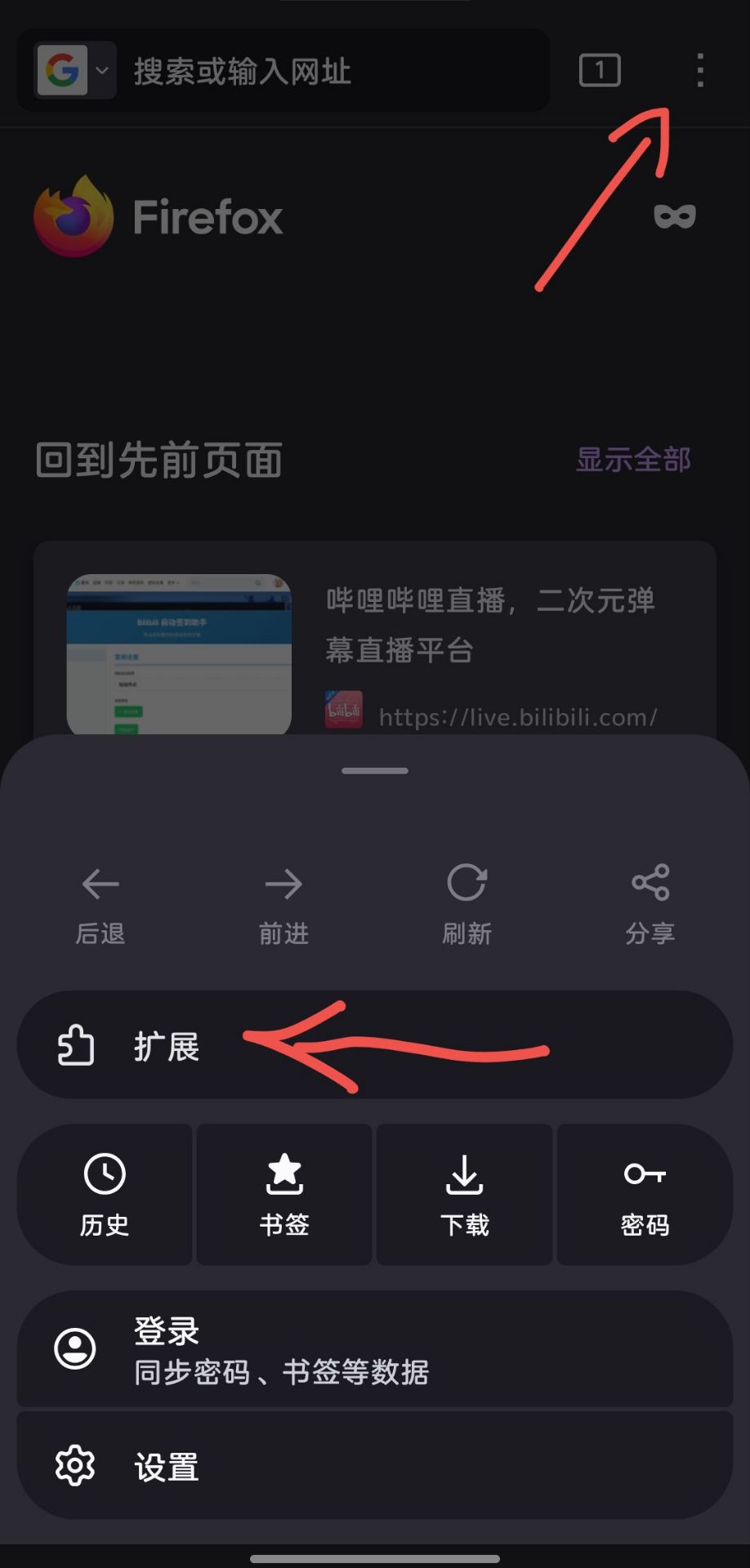
<p class="wp-block-paragraph">然后点击右上角的“更多”，接着选择“拓展”，<br>在打开的页面中划到最底部，选择“寻找更多拓展”，然后在应用商店中搜索“Tampermonkey”，安装篡改猴。</p>


<p class="wp-block-paragraph">如果你在点击“拓展”后的页面中能看见“篡改猴”，也可以直接点击“+”安装，反正只要在浏览器中安装了“篡改猴”这个插件即可。</p>
</div><figure class="wp-block-media-text__media"><a href="https://nicocat.cc/wp-content/uploads/2024/11/597335c49cbf5832aca20290e614900c.jpg" target="_blank" rel="nofollow noopener noreferrer"><img onerror="iroImgError(this)" loading="lazy" decoding="async" width="490" height="1024" src="https://nicocat.cc/wp-content/uploads/2024/11/597335c49cbf5832aca20290e614900c-490x1024.jpg" alt="" class="wp-image-1403 size-full" srcset=" https://moecat.cc/wp-content/uploads/2024/11/597335c49cbf5832aca20290e614900c-490x1024.jpg 490w, https://moecat.cc/wp-content/uploads/2024/11/597335c49cbf5832aca20290e614900c-143x300.jpg 143w, https://moecat.cc/wp-content/uploads/2024/11/597335c49cbf5832aca20290e614900c-768x1606.jpg 768w, https://moecat.cc/wp-content/uploads/2024/11/597335c49cbf5832aca20290e614900c-734x1536.jpg 734w, https://moecat.cc/wp-content/uploads/2024/11/597335c49cbf5832aca20290e614900c.jpg 918w" sizes="auto, (max-width: 490px) 100vw, 490px" / title="OCS网课助手使用教程（持续更新）"></a></figure></div>


<h4 class="wp-block-heading">以Edge为例</h4>


<p class="wp-block-paragraph">首先，在你的Android手机上安装Microsoft Edge浏览器（在国内手机应用商店或者酷安可以获取）<br></p>


<div class="wp-block-columns is-layout-flex wp-container-core-columns-is-layout-8f761849 wp-block-columns-is-layout-flex">
<div class="wp-block-column is-layout-flow wp-block-column-is-layout-flow">
<p class="wp-block-paragraph">然后点击右下角的“<strong>☰</strong>”呼出菜单，然后在呼出的菜单中选择“拓展”。<br>接着在打开的页面中选择安装篡改猴即可。</p>
</div>


<div class="wp-block-column is-layout-flow wp-block-column-is-layout-flow">
<figure class="wp-block-gallery has-nested-images columns-default is-cropped wp-block-gallery-3 is-layout-flex wp-block-gallery-is-layout-flex">
<figure class="wp-block-image size-full"><a href="https://wp.nicocat.cc/wp-content/uploads/2024/11/6917f24477587d29373b44960f616328.jpeg" target="_blank" rel="nofollow noopener noreferrer"><img onerror="iroImgError(this)" loading="lazy" decoding="async" width="930" height="1920" data-id="1552" src="https://wp.nicocat.cc/wp-content/uploads/2024/11/6917f24477587d29373b44960f616328.jpeg" alt="" class="wp-image-1552" srcset=" https://moecat.cc/wp-content/uploads/2024/11/6917f24477587d29373b44960f616328.jpeg 930w, https://moecat.cc/wp-content/uploads/2024/11/6917f24477587d29373b44960f616328-145x300.jpeg 145w, https://moecat.cc/wp-content/uploads/2024/11/6917f24477587d29373b44960f616328-496x1024.jpeg 496w, https://moecat.cc/wp-content/uploads/2024/11/6917f24477587d29373b44960f616328-768x1586.jpeg 768w, https://moecat.cc/wp-content/uploads/2024/11/6917f24477587d29373b44960f616328-744x1536.jpeg 744w" sizes="auto, (max-width: 930px) 100vw, 930px" / title="OCS网课助手使用教程（持续更新）"></a></figure>


<figure class="wp-block-image size-full"><a href="https://wp.nicocat.cc/wp-content/uploads/2024/11/28bb942c7d8bbd71e7f4f8038eca8acb.jpeg" target="_blank" rel="nofollow noopener noreferrer"><img onerror="iroImgError(this)" loading="lazy" decoding="async" width="1080" height="1581" data-id="1553" src="https://wp.nicocat.cc/wp-content/uploads/2024/11/28bb942c7d8bbd71e7f4f8038eca8acb.jpeg" alt="" class="wp-image-1553" srcset=" https://moecat.cc/wp-content/uploads/2024/11/28bb942c7d8bbd71e7f4f8038eca8acb.jpeg 1080w, https://moecat.cc/wp-content/uploads/2024/11/28bb942c7d8bbd71e7f4f8038eca8acb-205x300.jpeg 205w, https://moecat.cc/wp-content/uploads/2024/11/28bb942c7d8bbd71e7f4f8038eca8acb-700x1024.jpeg 700w, https://moecat.cc/wp-content/uploads/2024/11/28bb942c7d8bbd71e7f4f8038eca8acb-768x1124.jpeg 768w, https://moecat.cc/wp-content/uploads/2024/11/28bb942c7d8bbd71e7f4f8038eca8acb-1049x1536.jpeg 1049w" sizes="auto, (max-width: 1080px) 100vw, 1080px" / title="OCS网课助手使用教程（持续更新）"></a></figure>
</figure>
</div>
</div>


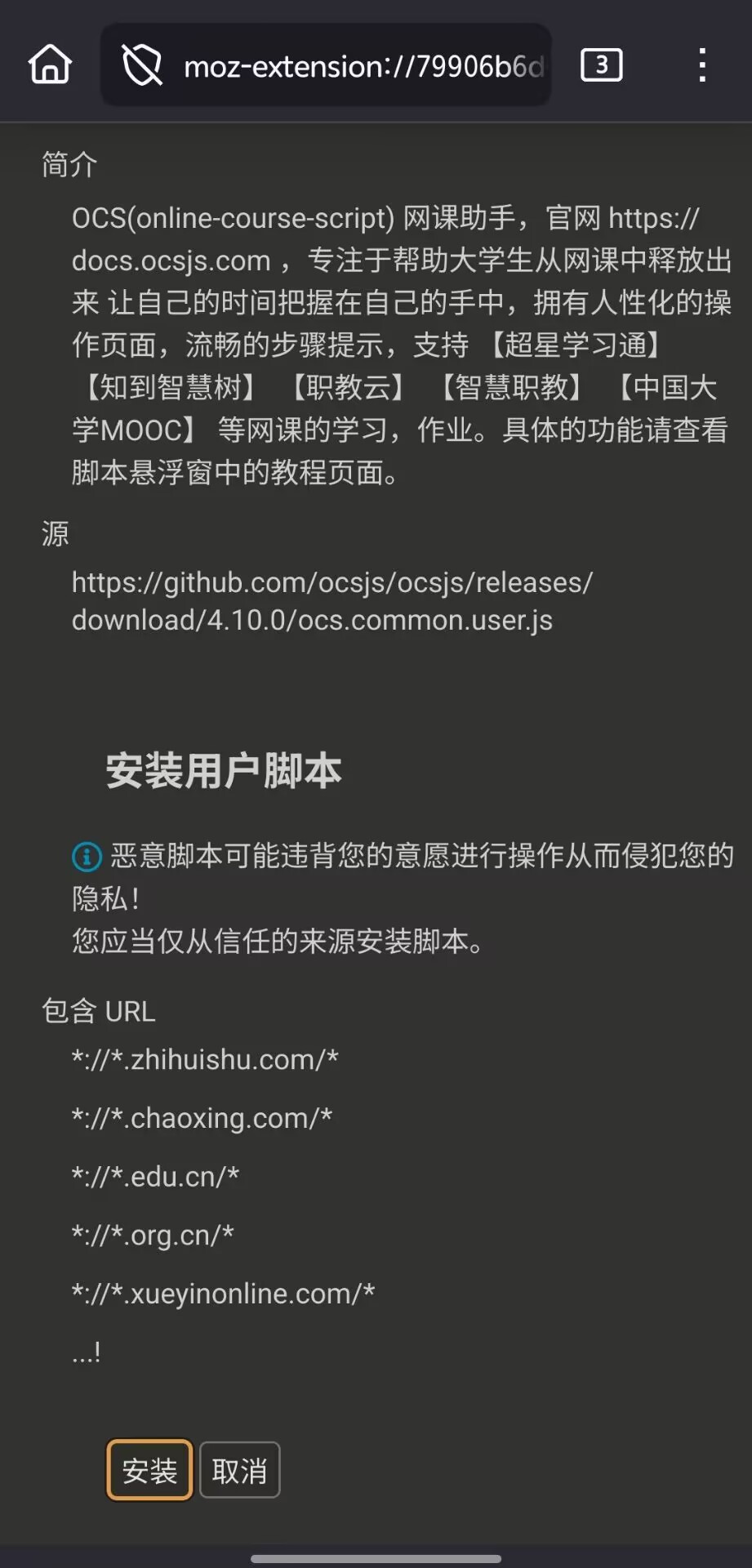
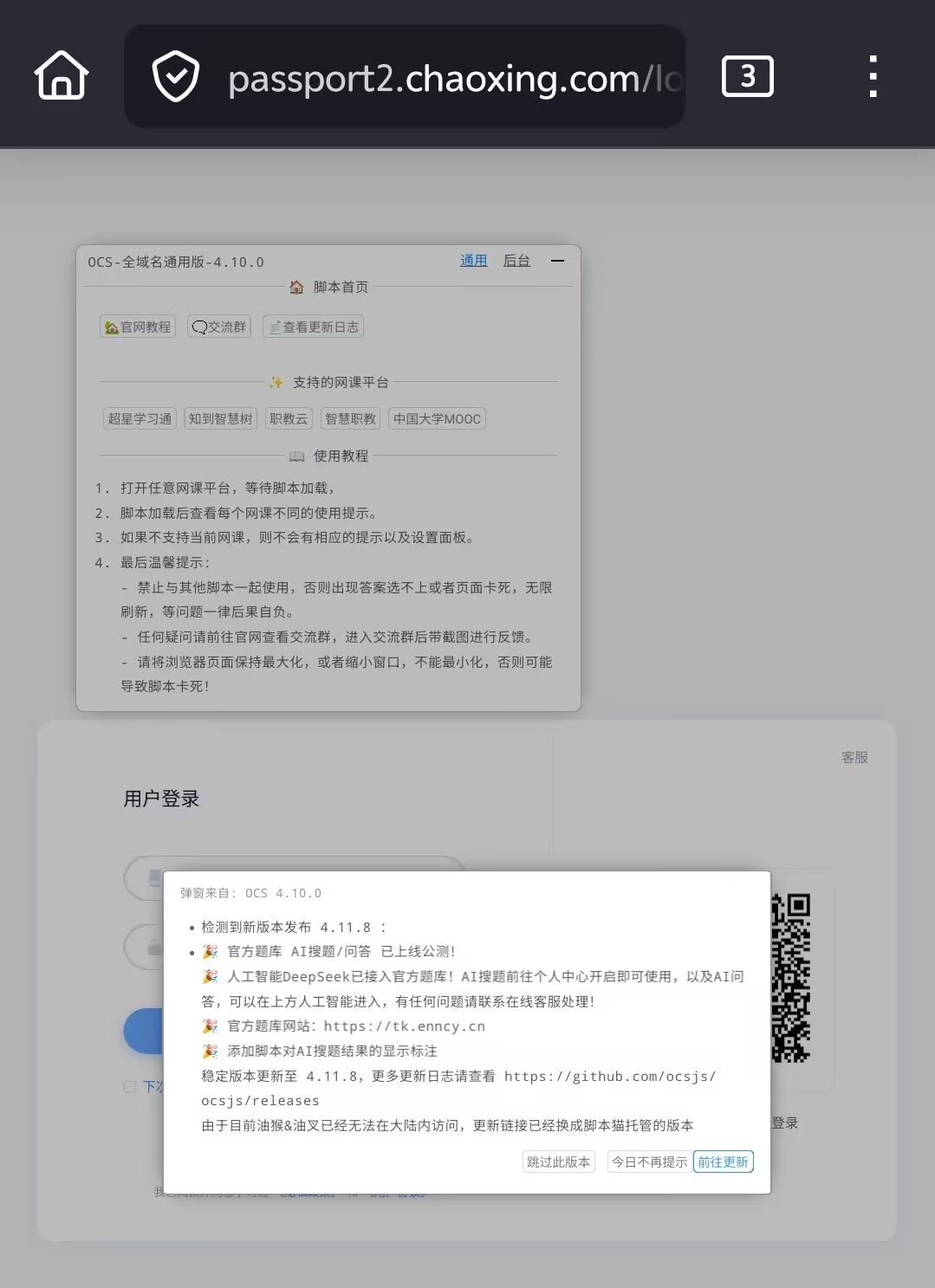
<p class="wp-block-paragraph">接着依旧是使用和电脑版同样的安装链接进行安装，点击前文的安装链接后没问题应该会弹出这样的窗口，点击安装即可，然后前往相关网课页后即可看到OCS网课助手的窗口了，配置和电脑端的一模一样，可以参考前文进行配置使用。</p>


<figure class="wp-block-gallery has-nested-images columns-default is-cropped wp-block-gallery-4 is-layout-flex wp-block-gallery-is-layout-flex">
<figure class="wp-block-image size-large"><a href="https://nicocat.cc/wp-content/uploads/2024/11/3565b1e40f042ac60685a43c3e41ae14.jpg" target="_blank" rel="nofollow noopener noreferrer"><img onerror="iroImgError(this)" loading="lazy" decoding="async" width="491" height="1024" data-id="1405" src="https://nicocat.cc/wp-content/uploads/2024/11/3565b1e40f042ac60685a43c3e41ae14-491x1024.jpg" alt="Firefox安卓上的OCS网课助手安装页" class="wp-image-1405" srcset=" https://moecat.cc/wp-content/uploads/2024/11/3565b1e40f042ac60685a43c3e41ae14-491x1024.jpg 491w, https://moecat.cc/wp-content/uploads/2024/11/3565b1e40f042ac60685a43c3e41ae14-144x300.jpg 144w, https://moecat.cc/wp-content/uploads/2024/11/3565b1e40f042ac60685a43c3e41ae14-768x1601.jpg 768w, https://moecat.cc/wp-content/uploads/2024/11/3565b1e40f042ac60685a43c3e41ae14-737x1536.jpg 737w, https://moecat.cc/wp-content/uploads/2024/11/3565b1e40f042ac60685a43c3e41ae14.jpg 921w" sizes="auto, (max-width: 491px) 100vw, 491px" / title="OCS网课助手使用教程（持续更新）"></a></figure>


<figure class="wp-block-image size-large"><a href="https://nicocat.cc/wp-content/uploads/2024/11/dbf42211719b235f0799115b494619a9.jpg" target="_blank" rel="nofollow noopener noreferrer"><img onerror="iroImgError(this)" loading="lazy" decoding="async" width="743" height="1024" data-id="1406" src="https://nicocat.cc/wp-content/uploads/2024/11/dbf42211719b235f0799115b494619a9-743x1024.jpg" alt="在Android手机上使用OCS网课助手" class="wp-image-1406" srcset=" https://moecat.cc/wp-content/uploads/2024/11/dbf42211719b235f0799115b494619a9-743x1024.jpg 743w, https://moecat.cc/wp-content/uploads/2024/11/dbf42211719b235f0799115b494619a9-218x300.jpg 218w, https://moecat.cc/wp-content/uploads/2024/11/dbf42211719b235f0799115b494619a9-768x1058.jpg 768w, https://moecat.cc/wp-content/uploads/2024/11/dbf42211719b235f0799115b494619a9.jpg 1079w" sizes="auto, (max-width: 743px) 100vw, 743px" / title="OCS网课助手使用教程（持续更新）"></a></figure>
</figure>


<h2 id="h-一些小技巧" class="wp-block-heading">一些小技巧</h2>


<div class="wp-block-media-text is-stacked-on-mobile"><figure class="wp-block-media-text__media"><img onerror="iroImgError(this)" loading="lazy" decoding="async" width="1024" height="576" src="https://nicocat.cc/wp-content/uploads/2024/11/1732606935-596e4217bdd922f4c2385255c795e32f-1024x576.png" alt="多任务" class="wp-image-531 size-full" srcset=" https://moecat.cc/wp-content/uploads/2024/11/1732606935-596e4217bdd922f4c2385255c795e32f-1024x576.png 1024w, https://moecat.cc/wp-content/uploads/2024/11/1732606935-596e4217bdd922f4c2385255c795e32f-300x169.png 300w, https://moecat.cc/wp-content/uploads/2024/11/1732606935-596e4217bdd922f4c2385255c795e32f-768x432.png 768w, https://moecat.cc/wp-content/uploads/2024/11/1732606935-596e4217bdd922f4c2385255c795e32f-1536x864.png 1536w, https://moecat.cc/wp-content/uploads/2024/11/1732606935-596e4217bdd922f4c2385255c795e32f-2048x1152.png 2048w" sizes="auto, (max-width: 1024px) 100vw, 1024px" / title="OCS网课助手使用教程（持续更新）"></figure><div class="wp-block-media-text__content">
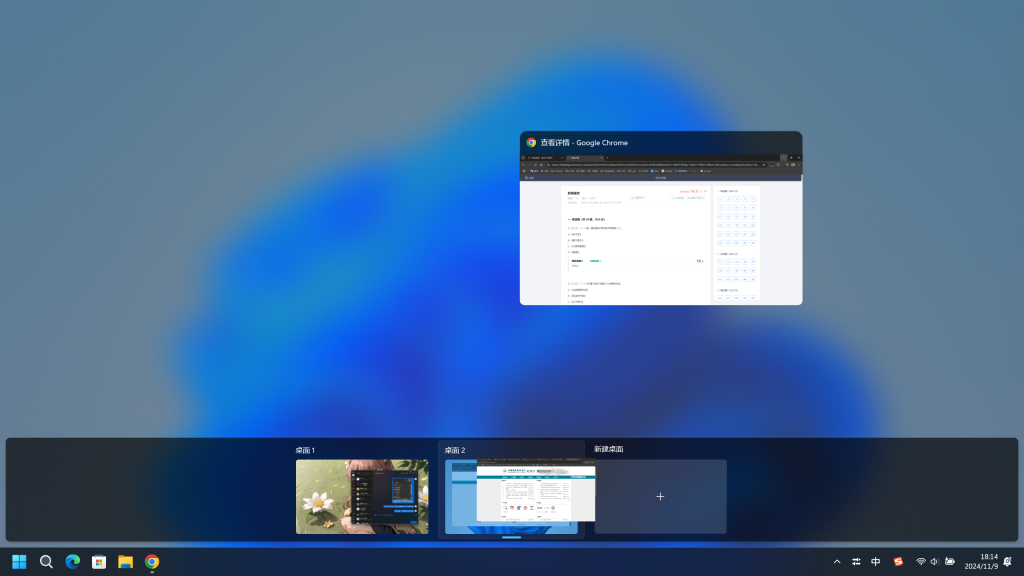
<p class="wp-block-paragraph">超星学习通会检测你的鼠标还在不在当前窗口，移动出后会停止播放，<br>如果不希望它影响你正常使用，可以使用<br>windows+Tab键新建一个桌面，把自动学习的窗口丢到后台，在刷课脚本的帮助下它仍然会自动推进进度，而你的前台工作不会因此受到影响</p>
</div></div>


<div class="wp-block-media-text is-stacked-on-mobile"><figure class="wp-block-media-text__media"><img onerror="iroImgError(this)" loading="lazy" decoding="async" width="697" height="679" src="https://nicocat.cc/wp-content/uploads/2024/11/1732607200-image.png" alt="脚本编辑" class="wp-image-532 size-full" srcset=" https://moecat.cc/wp-content/uploads/2024/11/1732607200-image.png 697w, https://moecat.cc/wp-content/uploads/2024/11/1732607200-image-300x292.png 300w" sizes="auto, (max-width: 697px) 100vw, 697px" / title="OCS网课助手使用教程（持续更新）"></figure><div class="wp-block-media-text__content">
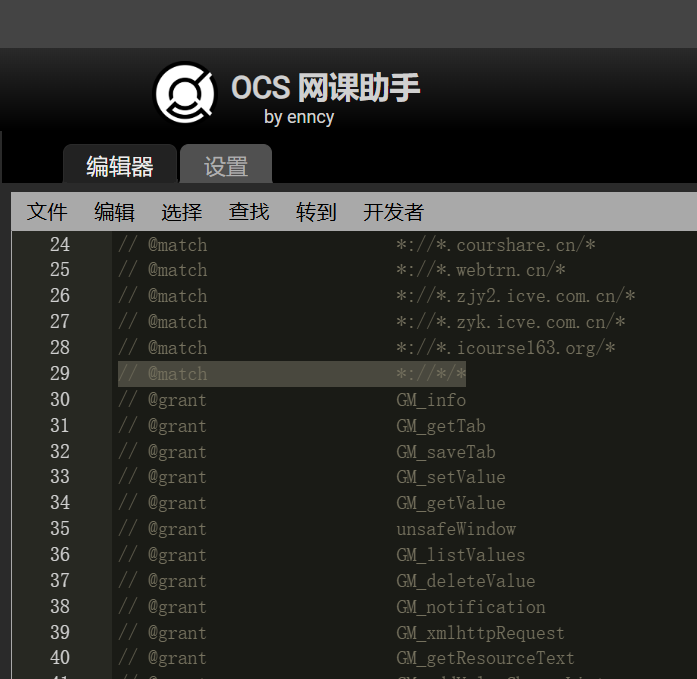
<p class="wp-block-paragraph">在OCS网课助手脚本的编辑页面临时加入这一行</p>


<pre class="wp-block-code"><code>// @match                   *://*/*</code></pre>


<p class="wp-block-paragraph">并保存可以让脚本在任何页面使用，搭配划词搜索可以更快完成任务</p>


<p class="wp-block-paragraph"></p>
</div></div>


<p class="wp-block-paragraph">使用倍速或通宵刷课可能会导致学习进度被清零，这些加速功能请酌情使用。</p>


<p class="wp-block-paragraph">只要是支持Tampermonkey的浏览器理论上都能使用，无论是哪个平台。</p>


<p class="wp-block-paragraph">OCS网课助手脚本是有缓存功能的，如果你已经完成了一次答题，可以登录宿友的学习号，利用缓存功能帮他们也快速完成一下练习作业，特别是在练习比较多的情况下，这个过程是不会消耗题库搜索次数的。</p>


<h3 id="h-结语" class="wp-block-heading">结语</h3>


<p class="wp-block-paragraph">希望我的这篇非官方帮助文档可以帮助到你们。</p>


<p class="wp-block-paragraph"></p>